
Quick answer: |
|---|
Your LinkedIn headline is a short positioning statement with wide visibility. Your headline is only one part of the profile, so use this guide to optimize your full LinkedIn profile.
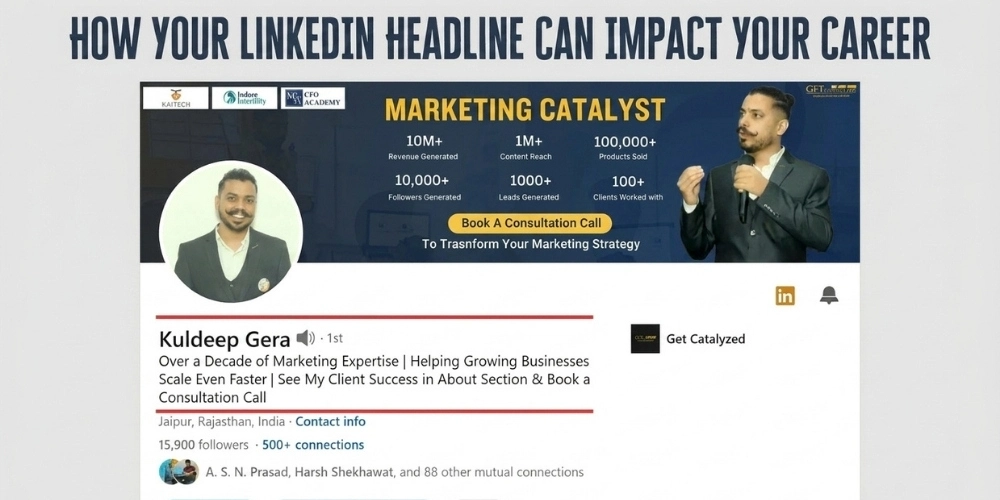
LinkedIn describes it as the text below your name in the introduction section and confirms that it appears in search results. It can also be different from the title of your current position.
A headline cannot guarantee profile views, recruiter interest, leads, or higher rankings. However, it can help people understand your expertise faster and decide whether your profile is relevant to them.
This matters on a platform with more than one billion members. LinkedIn also introduced AI-powered People Search that goes beyond exact keyword matching and uses language models to interpret intent and profile context.
The practical takeaway is simple. Write for people first, but make your role, specialization, audience, and evidence easy for both readers and search systems to understand.
What Is LinkedIn Headline Optimization?
LinkedIn headline optimization is the process of improving the professional headline below your name so it clearly communicates what you do, who you help, and why your experience is relevant. It combines clear positioning, relevant professional terms, credible evidence, and readable formatting.
Why Your LinkedIn Headline Matters More in 2026
A strong headline supports three important jobs. A better headline matters because your LinkedIn profile often matters more than a resume:
Clarity: It helps a visitor understand your professional focus quickly.
Discoverability: It gives LinkedIn relevant context when your profile appears in people searches.
Conversion: It gives the right visitor a clearer reason to open your profile, follow you, connect, or start a conversation.
LinkedIn search doesn't follow one fixed formula. People search results are personalized, and LinkedIn does not publish the exact weight assigned to the headline field. Its 2026 search architecture combines semantic understanding with profile information and other relevance signals.
Your public LinkedIn profile may also appear in external search engines when public visibility is enabled. Search engines decide how and when updated information appears, so a headline change may take time to be reflected outside LinkedIn.
The Anatomy of a Strong LinkedIn Headline
Most effective headlines combine three building blocks. The order can change depending on your goal, but the information should remain clear and verifiable.
Block | Purpose | Illustrative example |
|---|---|---|
1. Role and specialization | Names your function and narrows the context. | Senior Product Manager | B2B SaaS |
2. Audience and outcome | Explains who you support and the result you work toward. | Helping fintech teams simplify customer onboarding |
3. Proof or credibility | Adds evidence such as a verified result, credential, portfolio, or relevant background. | Reduced onboarding time by 40% | Formerly at Stripe |
Example formula: Senior Product Manager | B2B SaaS | Helping Fintech Teams Simplify Customer Onboarding | Reduced Onboarding Time by 40% |
|---|
Only use employer names, credentials, client counts, awards, and performance metrics that are accurate and can be supported if someone asks for evidence.
1. Front-Load the Most Important Information
LinkedIn allows up to 220 characters in a professional headline.
However, the amount displayed can vary by device, screen size, and LinkedIn surface. This makes the opening words especially important.
Start with the role, expertise, or business category you most want to be associated with. Do not begin with a long slogan that hides the professional context.
Less effective opening | Stronger opening |
|---|---|
Passionate professional with eight years of experience | Digital Marketing Manager | SEO and Paid Ads | Digital Marketing Manager | B2B SEO and Paid Ads | Building Qualified Pipeline |
Read only the first segment of your headline. If it does not explain what you do, rearrange the order.
2. Use a Role, Outcome, and Proof Formula
A job title provides useful context, but a title alone may not explain your specialization or value. Add an audience, outcome, or evidence when it improves clarity.
The formula works for job seekers, founders, consultants, and sales professionals because it answers three practical questions: What do you do? Who is it relevant to? What supports the claim?
Career stage | Illustrative headline |
|---|---|
Job seeker | UX Designer | Enterprise SaaS and Complex Workflows | Formerly at Adobe |
Founder | Founder, [Company Name] | AI-Powered Growth Systems for D2C Brands | Building for Series A Founders should also review these LinkedIn headline tips for founders to make their positioning clearer. |
Consultant | Email Marketing Consultant | Lifecycle Email Campaigns for E-commerce Brands | 200+ Successful Projects |
Sales professional | Enterprise Account Executive | B2B SaaS and Payments | $2.4M in Verified New ARR |
These examples are templates, not claims to copy. Replace every placeholder and proof point with information that is true for your profile.
3. Use Terms Your Audience Recognizes and Searches For
LinkedIn now combines traditional search signals with AI-powered semantic understanding. Its People Search can interpret natural-language intent instead of relying only on exact word overlap.
Relevant terms still matter because LinkedIn uses profile information to understand professional context. Choose wording that reflects your actual role, skills, industry, customers, and services.
A practical research process is to:
1. Review relevant job descriptions, client briefs, and LinkedIn profiles in your market.
2. Find the job titles, skills, industries, and business problems that best match your experience.
3. Use two or three of the most relevant terms naturally in the headline.
For example, Marketing is broad. Digital Marketing Manager | B2B SaaS | Demand Generation gives the reader more precise context without turning the headline into a list of disconnected keywords.
4. Replace Vague Adjectives With Specific Proof
Words such as passionate, dedicated, hardworking, and results-driven are difficult to evaluate. Specific evidence is more useful when it is accurate and relevant.
Vague wording | More specific wording |
|---|---|
Results-driven Sales Manager passionate about growth | Sales Manager | B2B SaaS | Grew Regional Revenue by 35% |
Dedicated Customer Success professional | Customer Success Manager | Enterprise Accounts | Reduced Churn by 25% |
Evidence does not always need to be a revenue figure. You can use a relevant certification, years in a defined specialty, a verified portfolio, a client count, a product launch, or a former employer. Choose the proof that matters most to the audience you want to reach.
5. Write for Semantic Search Without Keyword Stuffing
LinkedIn reported in January 2026 that its AI-powered Job Search and People Search use language models to understand intent and create a semantic search experience.
This does not make keywords irrelevant. It means a headline should provide coherent context instead of stacking unrelated terms.
Keyword stack | Clearer professional context |
|---|---|
Marketing | SEO | Content | Social Media | Email | Growth | Strategy | B2B Growth Marketer | SEO, Content, and Lifecycle Campaigns for SaaS Companies |
Use natural language and limit the headline to the roles, skills, industries, and outcomes that best support your current goal. Repeating terms or adding unrelated keywords does not guarantee better visibility.
6. Format for Fast Scanning
Formatting should make the headline easier to understand. It should not become a decoration exercise.
Use pipes or simple separators between distinct ideas.
Keep each segment concise and focused on one point.
Avoid all capital letters, repeated punctuation, and unnecessary symbols.
Use consistent capitalization. Sentence case or restrained title case both work when applied consistently.
Do not use emojis unless they are genuinely relevant to your brand and remain readable across devices. There is no published LinkedIn rule showing that an emoji automatically improves or harms search ranking.
7. Test, Measure, and Update When Your Positioning Changes
A LinkedIn headline should evolve with your role, goals, audience, and evidence. There is no official rule that says you must update your profile every two or three months. A quarterly review is simply a useful workflow for many professionals.
Every LinkedIn member can view basic profile analytics, including profile views and search appearances. These metrics can help you monitor visibility, although they do not prove that a headline change caused every increase or decrease.
1. Record your current search appearances, profile views, and relevant enquiries before making a major change.
2. Run one headline for several weeks so you have enough time to observe a directional pattern.
3. Change one major element at a time, such as the opening role, target audience, or proof point.
4. Review the quality of profile visits and conversations, not only the total number.
5. Update the headline immediately when your position, offer, target market, or strongest verified achievement changes.
Treat this as an informed test rather than a controlled experiment. Search demand, content activity, profile changes, networking, and seasonal hiring can all influence the results.
LinkedIn Headline Examples by Career Stage
The following examples are illustrative. Adapt them to your actual background and remove any claim you cannot verify.
Who it is for | Example headline |
|---|---|
Job seeker: Product | Product Manager | B2B SaaS | Turning Complex Workflows Into Simple Product Experiences |
Career changer | Former Teacher Moving Into UX Research | Eight Years of Interviewing and Learning Design | Google UX Certified |
Entrepreneur | Founder, BrightPath Analytics | AI Marketing Systems for Small Businesses | Open to Strategic Partnerships |
Industry expert | Cloud Security Architect | AWS and Azure Certified | Enterprise Data Protection |
Freelancer | Freelance Brand Designer | Visual Identity for D2C Startups | 60+ Verified Brand Projects |
Recent graduate | Computer Science Graduate | Full-Stack Developer | Three Production Applications | Open to Work |
Executive | VP of Marketing | Scaling B2B SaaS From Seed to Series C | Three-Time Head of Growth |
Common LinkedIn Headline Mistakes to Avoid
1. Leaving an Unedited Position-Based Headline
LinkedIn usually creates a headline when you add a new current position, but you can rewrite it to promote an area of expertise or another professional status.
Review the automatically created wording and decide whether it communicates enough context for your current objective.
2. Keyword Stuffing
A long list of titles and skills is difficult for people to read and does not guarantee better search visibility. Select the terms that accurately describe your current positioning.
3. Being Too Vague
Marketing Professional or Experienced Leader does not tell a reader which market, discipline, audience, or business challenge you understand. Add specific context.
4. Using Unsubstantiated Buzzwords
Labels such as guru, ninja, rockstar, visionary, or thought leader can weaken credibility when they are not supported by clear work or recognition. Replace self-awarded labels with evidence.
5. Hiding the Most Relevant Information
Do not place the role, specialization, or audience at the end of a long sentence. Different LinkedIn placements may shorten the displayed text, so the opening should still make sense on its own.
Conclusion: Make the Headline Clear, Relevant, and Verifiable
Your LinkedIn headline cannot create opportunities on its own. If you want expert help with your headline, About section, and profile copy, explore our LinkedIn profile writing support.
It can, however, make your positioning easier to understand when recruiters, clients, partners, investors, or peers encounter your profile.
Start with the role or expertise that matters most. Add the audience, specialization, or outcome you support. Include one credible proof point when it strengthens the message. Then keep the wording natural, place the strongest information first, and update it when your professional direction changes.
Write two or three versions and compare them against your actual objective. The best headline is not the one with the most keywords. It is the one that helps the right person understand your relevance quickly and accurately.