
You open LinkedIn. You scroll past a post about someone losing their job. Then you see the comments.
“CFBR.” “CFBR.” “Commenting for reach.”
It looks like a code. It feels like a robot invasion.
If you are wondering about the cfbr meaning in linkedin, the answer is simple. It stands for Commenting For Better Reach.
But knowing the definition is the easy part. The real question is whether you should use it.
Most guides will tell you it is a great hack to boost visibility. They are half right. It boosts visibility for the post. It does very little for you. In fact, it might actually make you look lazy.
Here is the truth about CFBR. We will cover how it works, why people use it, and how to support your network without looking like a bot.
What Does CFBR Actually Mean?
CFBR is an acronym used in the comments section of LinkedIn posts. Users type it to signal the LinkedIn algorithm.
The logic is straightforward. LinkedIn wants to show users engaging content. The algorithm measures engagement by likes, shares, and comments. Comments carry the most weight.
When you comment on a post, the algorithm thinks, “This discussion is interesting. Let’s show it to more people.”
So, when someone types “CFBR,” they are trying to manipulate the algorithm to give that specific post more visibility.
The usage of CFBR exploded around late 2022. The tech industry faced massive layoffs. Thousands of talented people lost their jobs overnight. The LinkedIn community rallied together. People wanted to help their peers find new roles. They started spamming “CFBR” on “Open to Work” posts to boost visibility.
It started as an act of solidarity. It has turned into something else entirely.
Common Variations You Will See
- CFBR: Commenting For Better Reach.
- Bump: A term borrowed from old internet forums to move a thread to the top.
- Commenting for reach: The literal explanation.
The Dark Side: Are You in a Pod?
You cannot talk about CFBR without mentioning “Engagement Pods.” These are groups of people, often strangers, who agree to comment on every single post a member publishes. The comment of choice? You guessed it: CFBR.
While this sounds like a clever way to beat the system, LinkedIn is actively fighting it. The platform’s engineering team has updated the algorithm to detect patterns of artificial engagement.
When the same small group jumps in to comment “CFBR” within minutes of a post going live, it can look like coordinated engagement. LinkedIn doesn’t officially call this a “shadowban,” but that kind of activity can limit how widely your future posts are shown.
On top of that, low-effort comments like CFBR don’t add real value and are much more likely to be pushed down compared to genuine, thoughtful responses.

The Algorithm: Why It Works
LinkedIn does not care if you type a Shakespearean sonnet or four letters. A comment is a comment.
When you drop a “CFBR” on a post, two things happen:
Network effect: The post may appear in the feeds of your connections.
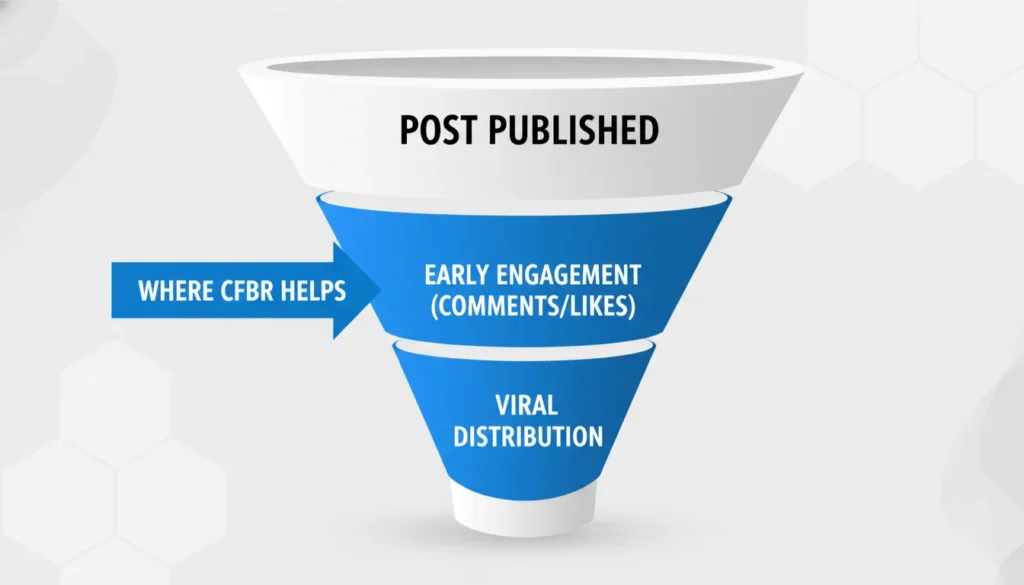
Viral trigger: The post gets a higher engagement score. LinkedIn shows it to a wider audience outside your immediate network.
This is why you see it so often on posts about layoffs or job searches. People want to help their friends get hired. They think typing an acronym is the fastest way to help.
They are not wrong. It is fast. But speed comes at a cost.
The Problem: Why CFBR Can Hurt Your Brand
Get Catalyzed focuses on storytelling and strong personal branding. From that perspective, typing “CFBR” is a wasted opportunity.
Imagine you are a recruiter or a potential client. You look at a candidate’s activity feed. You see 20 comments in a row that just say “CFBR.”
What is your impression?
- This person has nothing valuable to say
- This person is using a bot
- This person is lazy
The “Lazy Support” Trap
Supporting a colleague who was laid off is noble. But typing an acronym is the bare minimum. It is like signing a birthday card with “Regards” and nothing else.
If you truly want to help someone, a meaningful comment works better. The algorithm values “dwell time” (how long people spend on a post) and conversation depth. A specific comment invites replies. Replies create more comments. That is the real fuel for the algorithm.
The 24-Hour Experiment: Quality vs. Quantity
We wanted to see if the “lazy” approach actually saved time in the long run. We analyzed the performance of two different engagement strategies over a 24-hour period.
The Strategy:
- Group A (The CFBR Route): Left 50 comments saying “CFBR” or “Commenting for reach” on trending posts. Time taken: 15 minutes.
- Group B (The Value Route): Left 10 comments with at least 15 words, asking a specific question or sharing a personal insight. Time taken: 20 minutes.
The Results: Group A received zero profile visits and zero new connection requests. The comments were ignored or buried under hundreds of other acronyms. Group B received 12 profile visits and 3 connection requests from the original posters.
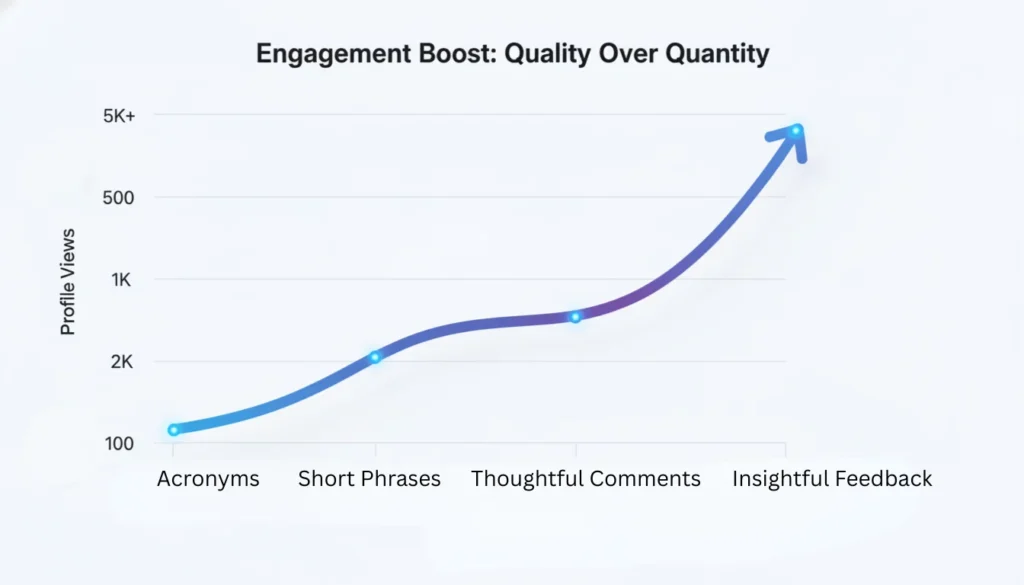
Why did this happen? It’s about space. A very short comment can disappear and be missed. A longer comment takes up room on the screen, so people notice it and read it. If you want people to see you, you need to be visible.
How to Do CFBR the Right Way (Storytelling Strategy)
You want to help your network. You also want to maintain a strong personal brand. You can do both.
Instead of typing “CFBR,” write a sentence that adds value. This is how you turn a generic tactic into a comprehensive digital marketing strategy for your personal brand.
Compare These Two Approaches
Option A: The Robot
Comment: “CFBR”
Result: The post gets a tiny bump. You look uninspired.
Option B: The Catalyst
Comment: “I worked with Sarah for two years. Her project management skills saved our Q4 launch. Any company would be lucky to have her leadership.”
Result: The post gets a massive bump because people read your comment. Sarah gets a testimonial. You look like a thoughtful leader.
Option B takes thirty seconds longer. The impact is ten times higher.
When Is It Okay to Use CFBR?
There are moments when the acronym is acceptable. Context matters.
Urgent Calls for Help: If a connection needs immediate visibility for a medical emergency or urgent donor request. Speed matters more than depth here.
Close Friends: If you have already messaged them privately and just want to give the post a quick nudge.
Viral Chains: Sometimes a post explicitly asks for “CFBR” to beat the algorithm.
However, relying on it as your main networking strategy is a mistake.
Turn Visibility Into Opportunity
Let’s say you start writing meaningful comments. You are helping others and getting seen by recruiters. People click on your name to see who wrote that insightful comment.
They land on your profile. What do they see?
If your linkedIn headline is vague and your banner is blank, you just wasted that attention. Reach means nothing without retention.
You need a solid foundation. Investing in professional linkedin profile optimization ensures that when people visit your profile, they stay there. You want to convert that casual browser into a connection or a client.

The Secret Metric: Dwell Time
There is a technical reason why the “Scripts” above work better than CFBR. It is called Dwell Time.
Engineers at LinkedIn have confirmed that the algorithm measures how much time a user spends looking at a post. If someone scrolls past a post, it gets a low score. If they stop to read the comments, the post gets a high score.
When you post a comment that’s 15 words or longer, you actually make people stop scrolling. This forces users to pause, read your insight, and signals to LinkedIn that the content is truly valuable.
This action boosts the original poster’s reach far more than a simple, single-second “CFBR in LinkedIn” ever could. By writing a thoughtful sentence, you genuinely help the algorithm, unlike those trying to trick it.
Summary: Stop Acronyms, Start Conversing
The cfbr meaning in linkedin is simple functionality. The secret to using LinkedIn effectively lies in prioritizing meaningful conversations over algorithmic tricks.
But LinkedIn is a networking event, not a video game. You wouldn’t walk into a conference room, shout “Visibility!” and walk out. You shouldn’t do it online either.
Your Action Plan:
- Stop auto-piloting with “CFBR.”
- Start leaving 2-3 sentence comments that validate the original poster.
- Audit your recent comments. Do you look like a human or a script?
If you are unsure if your current engagement strategy is actually building your brand, working with a LinkedIn personal branding consultant can help.
Audit your LinkedIn strategy with us and let’s get you recognized for your expertise, not just your acronyms.
Frequently Asked Questions
Yes, it does. LinkedIn counts it as engagement. However, comments that spark a conversation (replies) work much better. The algorithm prefers active discussions over single-word comments.
It depends on who is watching. To a friend, it looks like support. To a recruiter or client, it can look lazy or spammy. It is always safer and more effective to write a real sentence.
No, you won't get banned. But if you post it too fast on too many posts, LinkedIn might flag your account as a bot. This restricts your reach temporarily.
Write about the person or the topic. If it is a job seeker, mention a specific skill they have. If it is a content post, ask a question or share a takeaway.
Data suggests that longer comments (over 4-5 words) tend to perform better because they encourage the reader to stop and read (dwell time), which is a positive signal to LinkedIn.
Yes. Recent analysis of the algorithm suggests that comments with 15 words or more are weighted significantly higher than short phrases. This is likely because longer comments indicate genuine reading and thought, which LinkedIn prioritizes over bot-like behavior.
Emojis are better than nothing, but they suffer from the same problem as acronyms. A string of "fire" emojis adds very little value to the conversation. It is better to pair an emoji with a short sentence to show you actually read the content.
